 Join our Discord
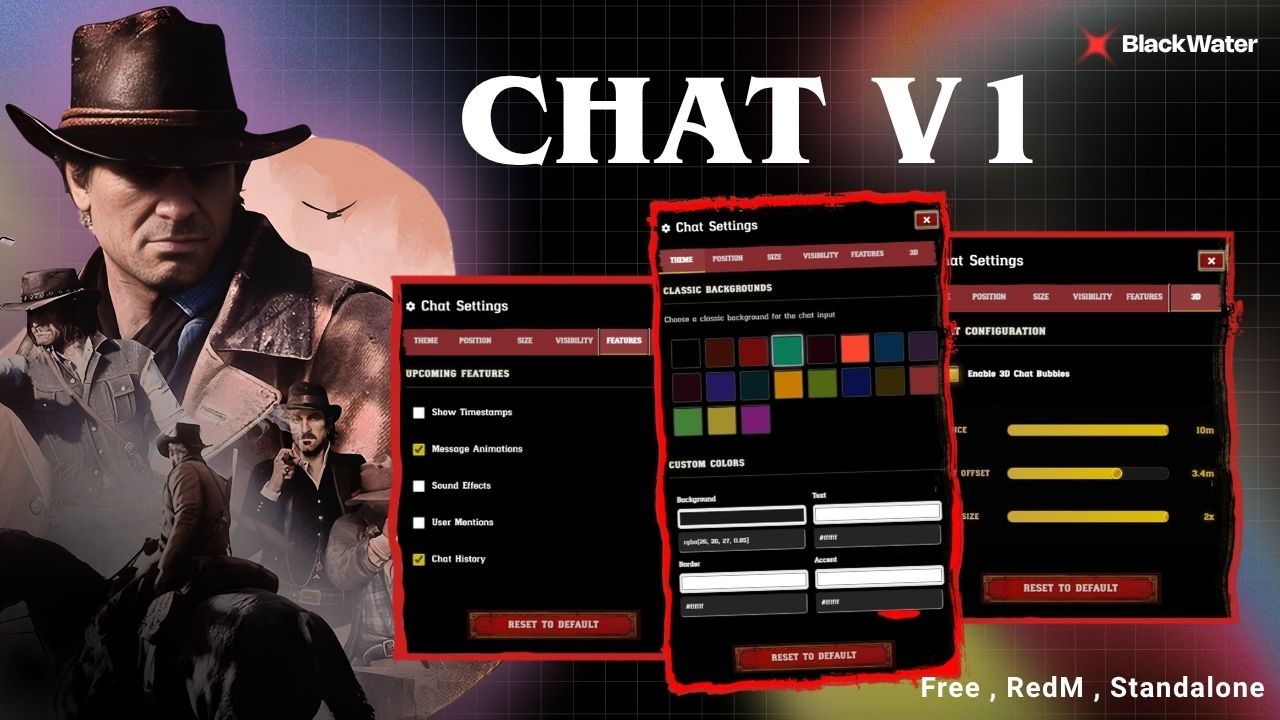
BW Chat v1 — The Ultimate Customizable Chat System
The most immersive, fully customizable chat replacement built for RedM (VORP) and FiveM servers. 19 classic backgrounds, 3D chat bubbles, in-game settings panel, RP commands, multi-language support, and a sleek dark-themed UI.
FREE and Open Source — You are free to use, modify, and distribute this resource.
LINKS
- Support Discord: https://discord.gg/UTjf8SvVpP
- Showcase Video: https://youtu.be/qHb0T8Dx-HE
FEATURES
Settings Panel (F7)
- - 6-Tab Settings Panel — Theme, Position, Size, Visibility, Features, 3D
- - Draggable Settings Panel — Move the panel anywhere on screen
- - Reset to Default — One-click reset for all settings
- - Persistent Settings — All preferences saved automatically per player
Theme & Customization
- - 19 Classic Backgrounds — Default + 18 western-styled chat input backgrounds
- - Custom Color Picker — Background, Text, Border, and Accent colors with live preview
- - 4 Color Themes — Default, Dark, Light, Colorful (or fully custom)
Chat Position & Size
- - 9 Chat Positions — Top Left, Top Center, Top Right, Middle Left, Center, Middle Right, Bottom Left, Bottom Center, Bottom Right
- - 4 Size Presets — Small, Medium, Large, Ultra Large
- - Draggable Chat Window — Drag the chat anywhere on screen
Visibility & Behavior
- - 3 Visibility Modes — On Typing, Always Visible, Active Only
- - Configurable Fade Timeout — Chat auto-hides after configurable delay
- - Smart Hide — Auto-hides during pause menu and screen fades
3D Chat Bubbles
- - Text Above Player Head — Messages appear in 3D space above players
- - Adjustable Distance — 1m to 10m render distance
- - Height Offset — 0m to 5m adjustable height
- - Bubble Size — 0.5x to 2x scaling
Roleplay Commands
- - /me — First-person action text above head
- - /do — Environment/scene description
- - /random — 50/50 success/failure outcome
- - /occ — Out of Character chat with prefix
- - /report — Player reports with Discord webhook integration
Discord Integration
- - Report Webhook — Player reports sent directly to Discord
- - Rich Embeds — Player name, ID, identifiers, timestamp, server name
- - Configurable — Custom webhook name, avatar, embed color
Message Templates
- - 17+ Message Templates — default, print, ooc, error, normal, report, success, warning, system, emergency, 911, 311, and more
- - Color-Coded Borders — Each message type has a unique color indicator
- - Rich Text Formatting — Bold, colors, and structured layouts
Additional Features
- - Smart Command Suggestions — Auto-complete as you type with parameter hints
- - Typing Sound Effects — Configurable sound file, volume, and toggle
- - Chat History — Arrow keys to scroll through previous messages
- - Message Timestamps — Optional timestamp display
- - Message Animations — Smooth message entry animations
- - Emote Integration — Pointing (B), Hands Up (X), Ragdoll (J) with cooldowns
Multi-Language Support
- - English, French, Spanish, German, Portuguese, Italian
INSTALLATION
1. Download and extract to your resources folder
2. Add ensure bw_chatv1 to your server.cfg
3. Configure shared/config.lua to your liking
4. Set up your Discord webhook URL in the config (optional)
5. Restart your server
INFO
Dependency: Standalone — No framework required
Compatibility: VORP, QBCore, ESX, or Standalone
Games: RedM (RDR3) & FiveM (GTA5)
Code Accessible: Yes — Open Source
Subscription: No — One-time free download
Lines: ~3500
Requirements: None
LINKS
- Support: https://discord.gg/UTjf8SvVpP
- Showcase: https://youtu.be/qHb0T8Dx-HE
Open Source — Free to Use
The full source code is available on GitHub. You are free to use, modify, and learn from this resource. Contributions, pull requests, and feedback are welcome!